Customize program
 |
|
|
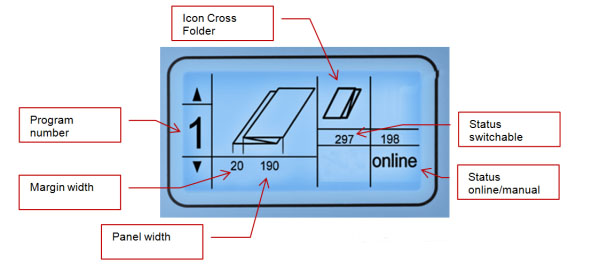
There are 8 folding programs available. Through the keys The center of the display shows an image of the selected fold style. In Order to change the status of the cross folder or the rotation unit press Buttons Pressing buttons  within three seconds to save the changes within three seconds to save the changes
|
|
|
All folding progams can be edited in increments of 1mm within the following range:
|
|
|
Press Pressing buttons |
|

|
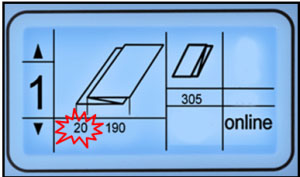
Example:Program 1 should process packages 185 mm wide with a filing margin of 25 mm.
|
|
|
|
Please notice that the adjustable width of the package must be at least 160 mm up to a maximum of 230 mm. The range of adjustment of the margin is 0 - 50 mm. Therefore a package of 155/65 is not adjustable. |
|

|
Change the cross fold length from 200mm to 420mm.
|
 and
and  you select the desired folding program.
 and
and  move the cursor from icon to icon.